
██╗  ██╗  ██████╗   ██╗   ██╗  ███████╗   ██████╗
  ██║ ██╔╝  ██╔══██╗  ╚██╗ ██╔╝  ██╔════╝  ██╔═══██╗
  █████╔╝   ██████╔╝   ╚████╔╝   ███████╗  ██║   ██║
  ██╔═██╗   ██╔══██╗    ╚██╔╝    ╚════██║  ██║   ██║
  ██║  ██╗  ██║  ██║     ██║     ███████║  ╚██████╔╝
  ╚═╝  ╚═╝  ╚═╝  ╚═╝     ╚═╝     ╚══════╝   ╚═════╝

白 河 愁
CleanSweep
Find and remove macOS app leftovers safely · 安全清理 macOS 应用残留
English · 中文
Version 20260820.3 · macOS 13+ · Apple Silicon / Intel Universal
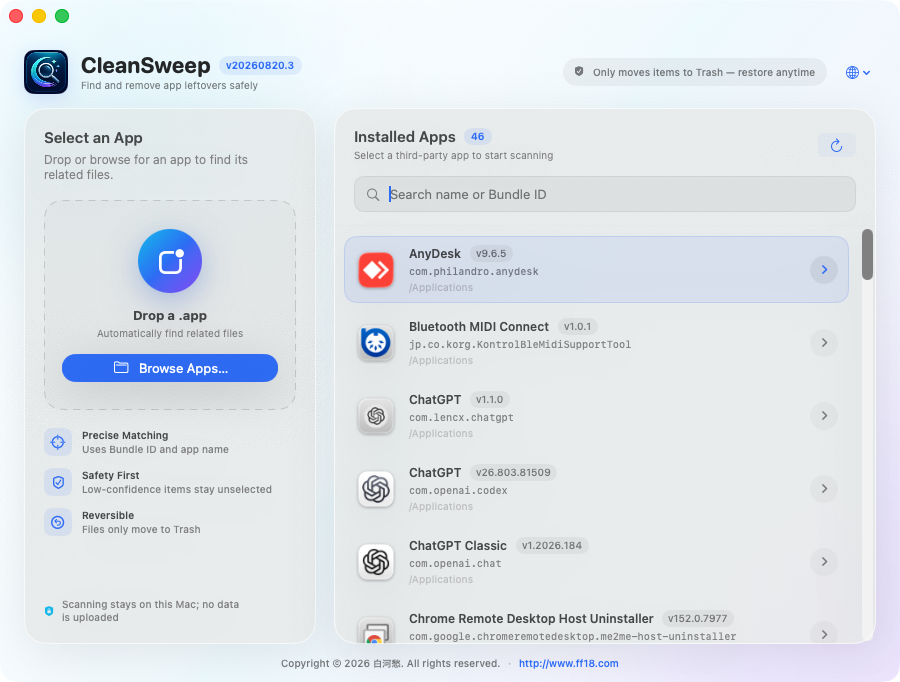
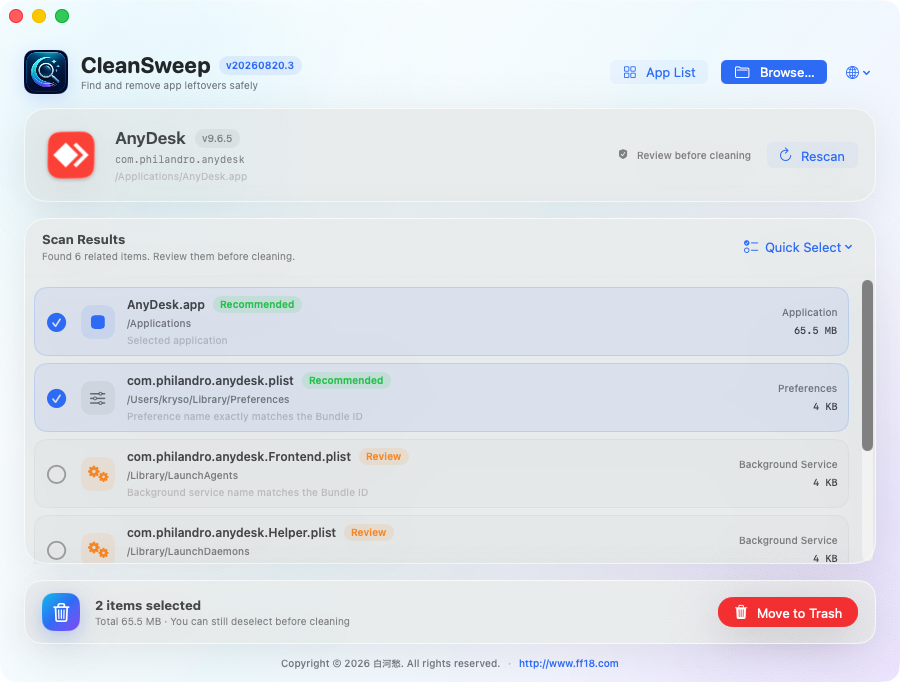
CleanSweep is a native macOS app cleaner. Select or drop an application to find related data, caches, preferences, logs, and background services using its Bundle ID and app name. Nothing is removed until you review and confirm the results.
Google Drive · CleanSweep 20260820.3.dmg
Publicly accessible without signing in.
Key Features
- Scans the Applications folder for third-party apps
- Supports drag and drop or selecting an app from disk
- Precisely matches common leftover locations by Bundle ID
- Shows paths, sizes, match reasons, and risk levels
- Preselects high-confidence items and treats uncertain matches conservatively
- Moves files to the macOS Trash so they remain recoverable
- Performs every scan locally and never uploads your data
- Globe language menu: automatic system-language detection plus English, Japanese, Cantonese, Traditional Chinese, Simplified Chinese, and Korean
Installation
- Download the DMG from Google Drive.
- Open the DMG and drag CleanSweep into Applications.
- Launch CleanSweep and select a third-party app to scan.
- Review the results, then move the selected items to Trash.
Security: Developer ID signed · Apple notarized · Gatekeeper verified. Because macOS has no universal uninstall manifest, discovery is heuristic. CleanSweep prioritizes exact Bundle ID matches and treats shared containers and system-level services conservatively.
中文版
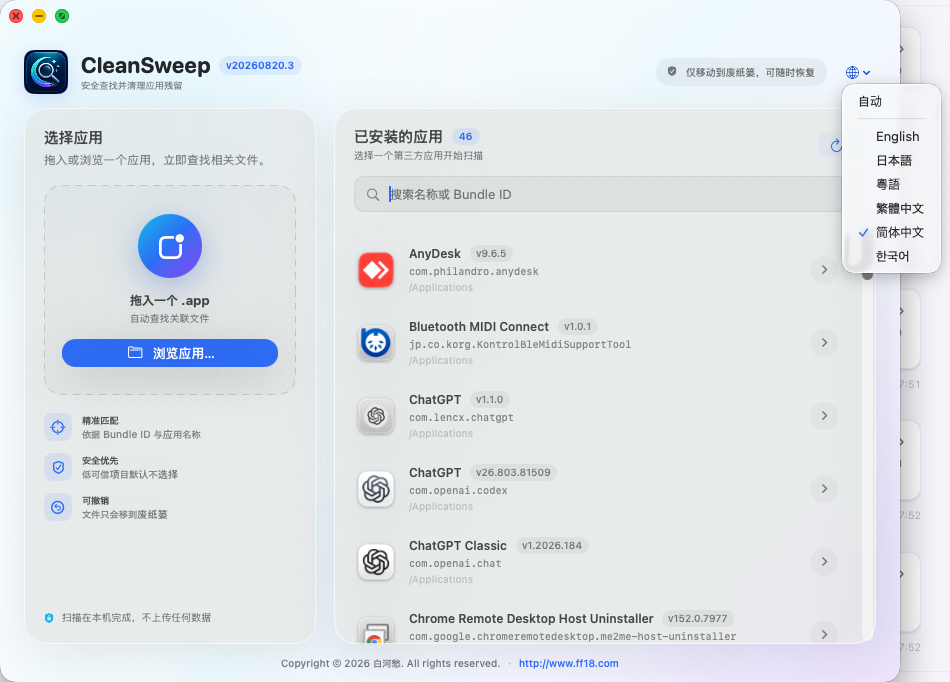
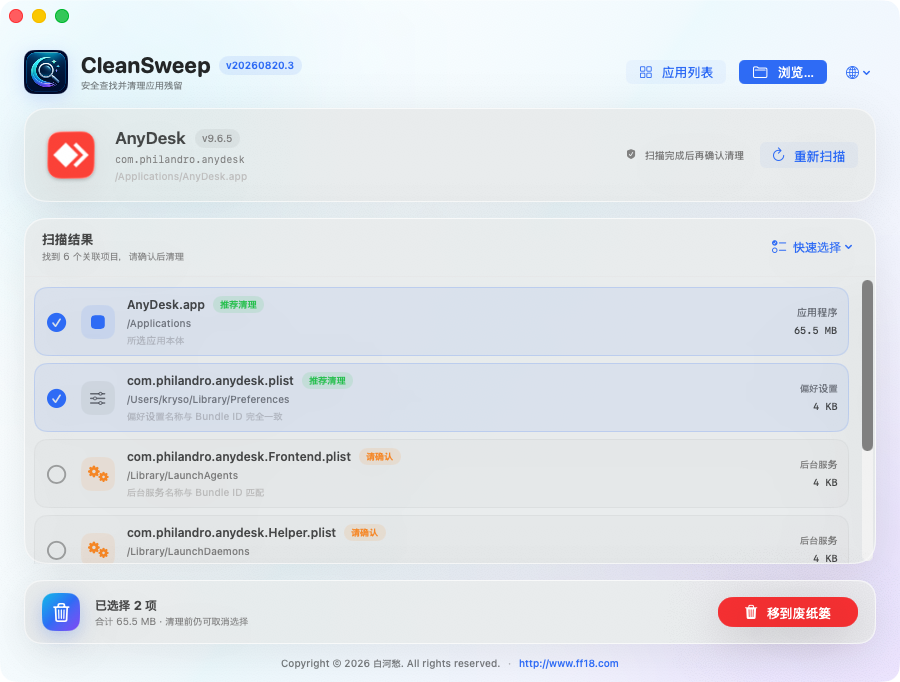
CleanSweep 是一款原生 macOS 应用清理工具。选择或拖入应用后,它会根据 Bundle ID 和应用名称查找相关数据、缓存、偏好设置、日志及后台服务,并在你确认后将所选项目移到废纸篓。
百度网盘提取码:wqv5
文件版本:20260820.3
主要功能
- 自动扫描“应用程序”文件夹中的第三方应用
- 支持拖入应用或从磁盘浏览选择
- 根据 Bundle ID 精确匹配常见残留位置
- 显示文件路径、占用空间、匹配理由和风险级别
- 高可信项目默认选择,需确认项目保守处理
- 文件只会移到系统废纸篓,需要时可以恢复
- 所有扫描均在本机完成,不上传任何数据
- 地球图标语言菜单:默认自动跟随系统,并支持 English、日本語、粵語、繁體中文、简体中文、한국어
安装方法
- 从百度网盘下载 DMG。
- 打开 DMG,将 CleanSweep 拖到“应用程序”文件夹。
- 启动 CleanSweep,选择一个第三方应用开始扫描。
- 确认扫描结果,再将所选项目移到废纸篓。
安全状态:Developer ID 签名 · Apple 公证 · Gatekeeper 验证通过。macOS 没有统一的卸载清单,因此扫描结果属于启发式判断;CleanSweep 会优先选择 Bundle ID 精确匹配项目,并保守处理共享容器和系统级服务。
Version / 版本校验
| Version | 20260820.3 |
| System | macOS 13+ |
| Architecture | Apple Silicon + Intel Universal |
| DMG SHA-256 | b2118cce44a2e4e523c71516bea7be4cf5adc33689203d3480f4de482142723c |
Copyright © 2026 白河愁. All rights reserved.
https://www.ff18.com